5 Low-Cost Ways to Make Your Small Business Look More Professional Online
Most small businesses don't have a professionalism problem. They have a presentation problem.
They do good work. They care about their customers. They're responsive enough. But that's not always what comes across when someone finds you online. A personal email address. No website. A half-finished Google profile. Quotes that change format every time. Nothing terrible on its own, but enough to make a potential customer pause.
And that pause matters.
Before someone hires you, they're usually not comparing you to a giant company. They're comparing you to the next business they found online. The one that looks more organized often feels safer to contact. People look for signs that a business is real, current, and easy to work with — and a lot of that comes down to how you show up online.
The good news? You don't need a big budget to fix this. A few practical upgrades can make your business look far more established in an afternoon.
1. Get a domain and a real business email
A custom email address is one of the fastest ways to make your business feel more established.
There's a real difference between john@82lawncare.co and bigmowerjohn82@comcast.net. One feels like a real business. The other can feel temporary — even if the service itself is excellent.
It's also one of the easiest upgrades to make. Buy a domain that matches your business name and set up one main email address you can use everywhere. If you already pay for iCloud+, Apple supports using a custom email domain with iCloud Mail, which makes it a practical low-cost option.
You don't need to get fancy with it. Start with one address that's simple and obvious:
- john@yourbusiness.com
- info@yourbusiness.com
Then use it everywhere a customer might see it: your website, Google profile, quote template, invoice, and social pages.
This does two things at once. It makes the business look more put together, and it keeps customer conversations out of your personal inbox. That matters more than you'd think once things start getting busy.
2. Claim your Google Business Profile
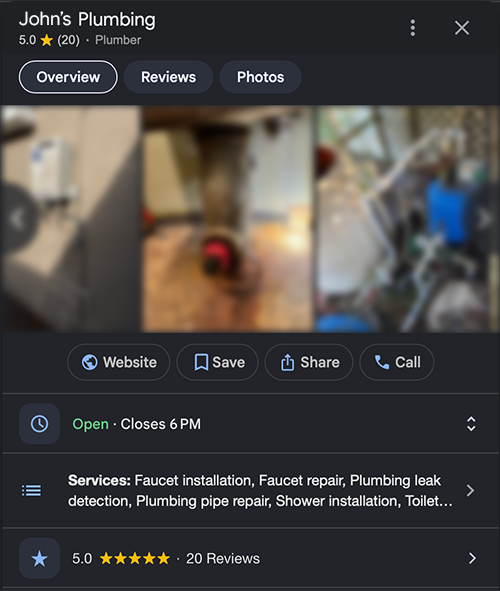
This is one of the best free things a small business can do.
A Google Business Profile lets you manage how your business shows up on Google Search and Maps — and it's free. It's not just for brick and mortar businesses, either. Google specifically includes service-area businesses, so it works even if you're doing work at customer homes, job sites, offices, or events.
That matters because a lot of people are going to Google your business before they reach out. Sometimes they're checking whether you're legit. Sometimes they just want your phone number or to see if you serve their area.
A half-finished profile creates doubt. A complete one builds trust.
At a minimum, make sure yours includes:
- your correct business name
- phone number
- website
- service area
- hours or availability
- a short description
- real photos
If you can add reviews over time, even better.
It's a small detail that carries a lot of weight. It costs nothing, helps you show up in local search, and gives people a quick way to confirm you're a real business.
3. Put up a simple website that answers the obvious questions
Your website doesn't need to impress anyone. It just needs to remove doubt.
A lot of owners put this off because they think a website has to be polished, custom, and full of pages. It doesn't. What matters is that someone can land on it and quickly figure out what you do, who you help, where you work, and how to contact you. Those basics are what build credibility and make it easier for someone to take the next step.
For a lot of small businesses, a one-page website is enough to start.
That page should clearly answer:
- what your business does
- who it's for
- where you work
- how to get in touch
- what the next step is
That's enough to do the job.
You can strengthen it with a few practical trust signals:
- real photos of your work
- a short list of services
- testimonials or reviews
- the towns or areas you serve
- a clear button to call, email, or request a quote
The main thing is clarity. If a visitor has to guess whether you do the kind of work they need, or how to reach you, the site isn't helping. Simple beats impressive here every time.
4. Clean up your quotes and invoices
You can do excellent work and still look disorganized if your paperwork feels rushed.
Customers notice when a quote is vague. They notice when the total is buried. They notice when the invoice looks different every time, or when it's not clear how to approve the work or pay the bill.
That's why templates matter. They save time, reduce mistakes, and keep your communication consistent — instead of rebuilding the same document from scratch every time.
A clean quote should answer the obvious questions:
- what's included
- what it costs
- what's not included, if that matters
- how long the quote is valid
- what the customer should do next
A clean invoice should answer these:
- what they're paying for
- how much is due
- when it's due
- how to pay
- who to contact with questions
This doesn't need to be overdesigned. It just needs to feel clear and repeatable.
If you're writing these from scratch every time, start with one template and stick to it. Use the same business name, same logo, same contact info, and same format each time. That alone makes your business feel more established — and it saves you time and effort.
5. Make your customer-facing pieces match
This is where a lot of businesses accidentally look scattered.
Maybe your website uses one logo, your business card uses another, and your Facebook page spells the business name a little differently. Maybe your quote comes from one email address, your contact form sends to another, and your Google profile still points to an old phone number.
On their own, none of those are a deal breaker. Together, they make the business feel less steady.
Customers usually can't explain why something feels off — they just notice it. People build trust from seeing the same thing everywhere they interact with your business, and inconsistency chips away at that without anyone realizing it.
That means your customer-facing pieces should match:
- business name
- logo
- phone number
- website
- colors
- tone of voice
When your website, Google profile, email, quotes, and invoices all feel like they belong to the same business, people trust you faster. They might not think about it in those exact terms, but they feel it.
This is also where something like ShepherdWorks starts to make sense. Not because every small business needs software on day one, but because once you start growing, it helps to have one place where your public pages, customer info, quotes, invoices, and branding all stay in sync.
Final thought
Looking more professional online isn't about pretending to be bigger than you are.
It's about making it easy for someone to see that your business is real, active, and ready to work.
A real business email. A complete Google profile. A simple website. Cleaner quotes and invoices. A consistent customer experience.
Those aren't flashy changes. But they're the kind that make people feel more comfortable reaching out, saying yes, and trusting you with the work.
For a small business getting established, that's often what matters most.